Opening, closing and the day's report
The float, counting the drawer, what a shortfall means, and every figure on the counter report explained.
A shift is what makes the drawer countable. The cashier records the cash they started with, and at the end the cash they actually counted. The difference between the two is the only number that matters at handover.
Opening the till#
- On the POS screen, look at the thin bar under the top strip. Amber, with Till is closed written on it, means the drawer is shut.
- Press Open till. A small box opens headed Open the till, with your counter's name beside it.
- In Opening cash (float), type the cash already in the drawer before the first sale. Press Open till, or just press Enter.
- It worked when the bar turns green and reads Open since… · float …, with a Close till button on the right.
Closing the till and counting the drawer#
- Count the cash in the drawer by hand, notes and coins, before touching the screen.
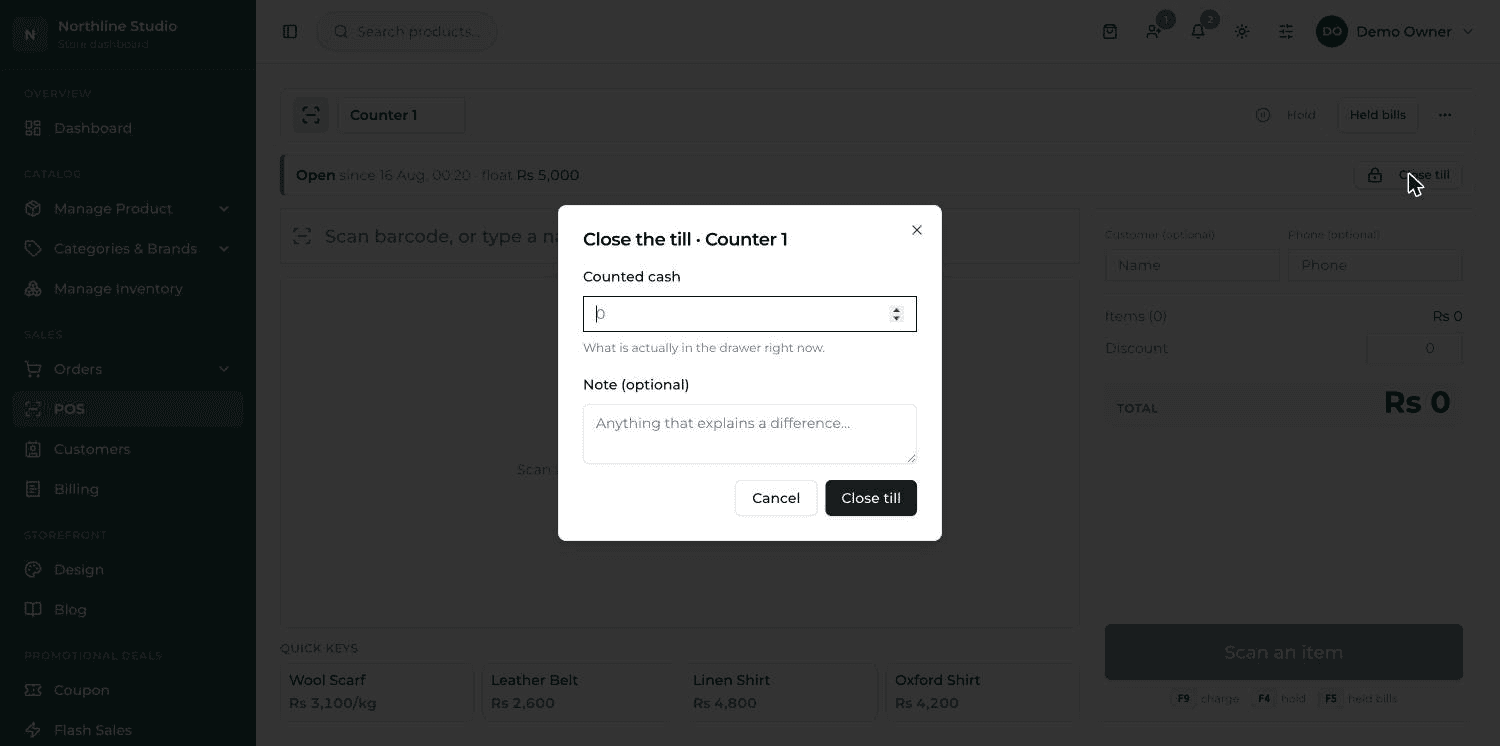
- Press Close till on the green bar.
- Type what you counted in Counted cash. This is what is actually in the drawer right now, not what you think it should be.
- Write a line in Note if anything explains a difference — money taken out for change, a supplier paid in cash.
- Press Close till. The bar goes amber again and a small panel appears underneath with Expected, Counted and Difference.
Counted, expected, and the difference#
- Expected — the float you opened with, plus every rupee of CASH taken during the shift. A cash bill adds its whole total; a split bill adds only its cash half.
- Card money is never part of it. It never reaches the drawer, so it can never be counted out of it.
- Counted — the number the cashier typed after counting by hand.
- Difference — counted minus expected. Zero is a clean handover.
What a shortfall means#
A negative difference is shown in red and labelled short — there is less cash in the drawer than the shift's sales say there should be. It is worth asking about, but it is not automatically theft.
- Change given from the drawer that was never noted down.
- Money taken out during the day — a supplier paid, a bill paid in cash.
- A sale rung up as cash but actually taken on the card, or the other way round.
- Bills rung up before the till was opened — those are not in the expected figure at all.
The day's report#
This is the end-of-day sheet — what the counter took and whether the drawer balanced. Only a Manager, Admin or Super Admin can open it.
- On the POS screen press ⋮ at the top right and choose Report.
- Pick the days with Today, Yesterday or Last 7 days, or type your own From and To dates.
- Narrow it if you want: type a counter name in Register, or pick a branch in Branch.
- Press Show report.
What each figure is#
| Figure | What it is |
|---|---|
| Net revenue | Everything taken over the counter, minus everything handed back as refunds. |
| Cash | The part paid in cash — the whole of a cash bill, plus the cash half of a split. |
| Card | The part paid on a card, plus the card half of a split. |
| Orders | How many bills were rung up in the period. |
| Average bill | What was taken, divided by the number of bills. |
| Discount given | All the money taken off bills at the counter. |
| Tax collected | Tax charged on top of the goods. It is held for the government, not earned by the shop. |
| Refunded | Money handed back over the counter in the same period. |
| Cost | What the goods that were sold cost the shop to buy, taken from each product's cost price at the moment it was sold. |
| By cashier | The same takings split up by who rang them. |
How profit is worked out#
Profit starts from what was taken and takes three things off it: the tax collected, because that is not the shop's money; anything refunded, because that was never earnings; and what the goods cost to buy.
The profit line, in words
Taken − tax collected − refunded − what the goods cost. The screen prints that sentence under the figure with your own numbers in it, so you can always check it.
Shift history#
Underneath the report is every recent shift: which counter, who opened it, who closed it, the float, expected, counted and the difference. A shift still running says Still open instead of a made-up zero.