For shops that sell online, at the counter, or both
Sell online. Sell at the counter. Run both from one screen.
A shop your customers buy from, a till your staff ring sales on, and one dashboard behind them. The same products, the same stock, counted once. Built and set up for your business, then it is yours to run.
- Your own domain
- Works on a phone and a desktop
- You change the content yourself
A shop that is actually yours
You get a real shop on your own address: a storefront customers browse and buy from, and a private dashboard where you add products, watch orders come in, answer your customers and see what sold. If you also sell over a counter, the till runs on the same products and the same stock.
It is set up for your trade rather than handed to you empty — your categories, your colours, your pages. After that the day-to-day is yours: prices, photos, home page, text. Nothing needs a developer.
Five ready designs, built for five kinds of shop
Clothing, food, mobile shop, portfolio and medical. Pick the one that fits and the whole shop is set up in that style, pages and all — then the colours, photos and wording are yours to change.
Clothing
Food
Mobile shop
Portfolio
Medical
Each one is a starting point. Every colour, block and page can be changed from the dashboard afterwards.
Not sure which one your shop starts from?
Tell us what you sell and we will tell you which design fits it, what would have to change, and how long it would take to be live on your own address.
Everything a shop needs, already connected
Not a page builder you have to assemble. These are the parts of running a shop, built once and wired to each other — so a sale at the counter and a sale on the website move the same stock.
- Products & stock
- Orders & checkout
- Customers
- Discounts & deals
- Reviews you approve
- Blog & pages
- Your own domain
- One dashboard
- Found on Google
Your shop, your look
The site your customers see — set up for your trade, then changed from the dashboard.
Built for your trade
Choose from five ready designs — clothing, food, mobile shop, portfolio and medical — and the whole shop is set up in that style, pages and all. Your colours, fonts and wording go on top.
A home page you arrange
The home page is made of blocks: a banner, a row of categories, the products you pick, a strip of reasons to buy from you. Reorder them, rename them, or take one off.
Product pages that answer questions
Sizes, colours and other choices are handled, and you can charge extra for add-ons like a topping, a case or gift wrap. Photos, description and specifications are yours to write.
Cart and checkout your way
The cart and checkout can look the way you want, changed from the dashboard, no code. Ask only for what you need at checkout, and add your own fields if your business needs them.
Blog, extra pages and reviews
Write posts and build pages — about, contact, anything else. Customers can review products, and nothing goes live until you approve it.
Accounts, without a barrier
Shoppers can make an account to keep an address and see past orders. Anyone who does not want one still buys as a guest and follows the order from a tracking link.
Getting people to buy
Run a promotion yourself, on the day you decide to run it.
Discount codes
Make a code for a fixed amount or a percentage, with an expiry and a limit on how many times it can be used. The discount is recalculated on the server, so it cannot be tampered with at checkout.
Sales that start and stop on their own
Set a price cut with a start and end time and it switches itself on and off. Buy-one-get-one deals work the same way, and the offer shows on the product, in the cart and at checkout.
A message when someone arrives
Show a popup for a sale, a holiday notice or a new arrival. It is off unless you turn it on, and a visitor only sees it once.
Reminders for the carts that were left
When someone fills a cart and does not finish, it appears in a list with what they were buying. Send them a reminder email in one click.
Nudges on the page
Show "only 3 left" when stock is low, a delivery estimate, and the small trust badges that reassure a first-time buyer.
Gift wrapping
Offer wrapping as a paid option at checkout. The fee is added to the order and shown to you with it, so nobody has to remember.
Running the shop
Everything you touch on a normal working day, in one place.
Products, in bulk when you need to
Add a product with photos, categories, brands and tags. If you already have a catalogue somewhere else, bring it in from a spreadsheet — and take yours back out the same way.
Stock that keeps itself
Stock comes down with every sale, online or at the counter. Set the level for each product where you want to be warned, and low stock shows on the first screen.
Orders from start to finish
Every order in one list. Move it through its stages, add the courier and tracking number, and the customer gets an email each time it changes.
Returns and refunds
A customer can ask for a return from their order page. You approve or refuse it, and an approved return puts the money and the stock back where they belong.
Print what the job needs
An invoice and a packing slip print straight from the order, and the packing slip carries no prices. Barcode labels print by the sheet or on a label roll.
Know how the shop is doing
Sales, best sellers and stock value on the dashboard, with reports for a day, a week or any range you pick.
Selling at the counter
A till for the shop floor, on the same products and the same stock as the website.
Ring a sale in seconds
Scan a barcode, take cash, card or a split of both, print the receipt. A product sold at the counter never has to be typed in twice.
Hold a bill and come back to it
Park a bill while that customer goes back for one more thing, serve the next person, then bring the first bill back and finish it.
Sell by weight
Loose goods carry a price per kilo and sell by the gram. Put it on the scale, type the weight, and the price is worked out for you — and taken off the right amount of stock.
Close the till and know where you stand
Open a shift with the float, close it with what is actually in the drawer, and see the day's cash, card, refunds and whether you are short.
Rules that protect the till
A discount needs a manager to approve it, and a return at the counter cannot go past what that bill actually sold.
More than one shop
Each branch keeps its own stock and its own till. Move stock between branches, receive new stock in with the supplier and cost, and keep tap keys on screen for the things with no barcode.
Staying in control
Who can do what — and what happens when someone gets it wrong.
A login for every person
Five roles, from owner down to counter staff, and you can allow or block individual actions on top. Nobody has to share your password.
Deleting is not final
Deleted products, categories and orders go to a recycle bin for 30 days. The owner puts them back, and past sales keep their record either way.
Ask before deleting
Staff who are not allowed to delete can request it instead. You see what they want removed and why, and approve or refuse it.
A record of who changed what
Important changes are logged with the person and the time. A question about a price or an order has an answer.
Backups you can hold
Backups are part of the service, and you can take one yourself from the dashboard and download the file to keep.
Growing the business
Your own address, found on search, and paid for properly.
Your own domain
Start on a temporary address the day the shop is built, and move to your own domain when you are ready. If you do not have one yet, we will help you get it.
Ready to be found
Page titles and descriptions you control, a sitemap, and the structured data search engines read. Product pages and blog posts carry their own.
See where people come from
Paste in your Google Analytics or Meta Pixel ID and it is live on the shop. No plugin, no developer.
Emails that go out without you
A confirmation when someone buys, and another each time the order moves. They carry your shop's name and logo.
Take the money the way your customers pay
Cash on delivery, card payments through Stripe, and bank transfer with your account details shown at checkout and the payment marked off when it lands.
Delivery and tax, set once
Add your delivery options with their own charge and rough delivery time, make it free over an amount if you want, and set your tax rate.
The counter
A real till for your counter, on the same stock as the website
Scan the barcode, take cash or card, print the receipt. It is a screen in the browser you already have open — selling from the same products, the same prices and the same stock count as your shop online, so nothing is ever entered twice.
- ScanBarcode in, line on the bill.
- BillCash, card, or a split of both.
- PrintAn 80mm receipt, in seconds.
Scan, search, or tap
A scanned barcode drops straight onto the bill, and scanning the same thing again puts its quantity up rather than adding a second line. Nothing without a barcode gets stuck: find it by name, or keep it on screen as a tap tile.
Cash, card, or both
Take it all in cash with the change worked out for you, take it on card, or split it between the two. A split that does not add up to the bill is refused by the server, not just by the screen.
Hold a bill, serve the next customer
Park a bill while that customer goes back for one more thing, then bring it back and finish it. A held bill remembers the goods and not the prices — those are read again when you recall it.
Sell loose goods by weight
Put a price per kilo on a product and sell it by the gram. Type the weight, or tap a quarter, a half or a full kilo, and both the price and the stock follow.
Close the drawer honestly
Open the shift with the float, close it with what is actually in the drawer, and the till shows you what it expected, what you counted, and the difference between them.
Customers who pay later
Keep a running account for the ones who settle at the end of the month, with a limit on each and a statement to print. Going over a limit takes a manager.
It runs in a web browser on a laptop, a desktop or a tablet — nothing to install. It needs an internet connection to sell, because every price and every stock count is read from the server as it happens. And it is switched on shop by shop: sell online only, and it is never in your way.
Everything the till doesThe real thing
This is the screen, not a drawing of it
Every picture below is the dashboard as it comes — our own demo shop, so nothing here is a customer's data.
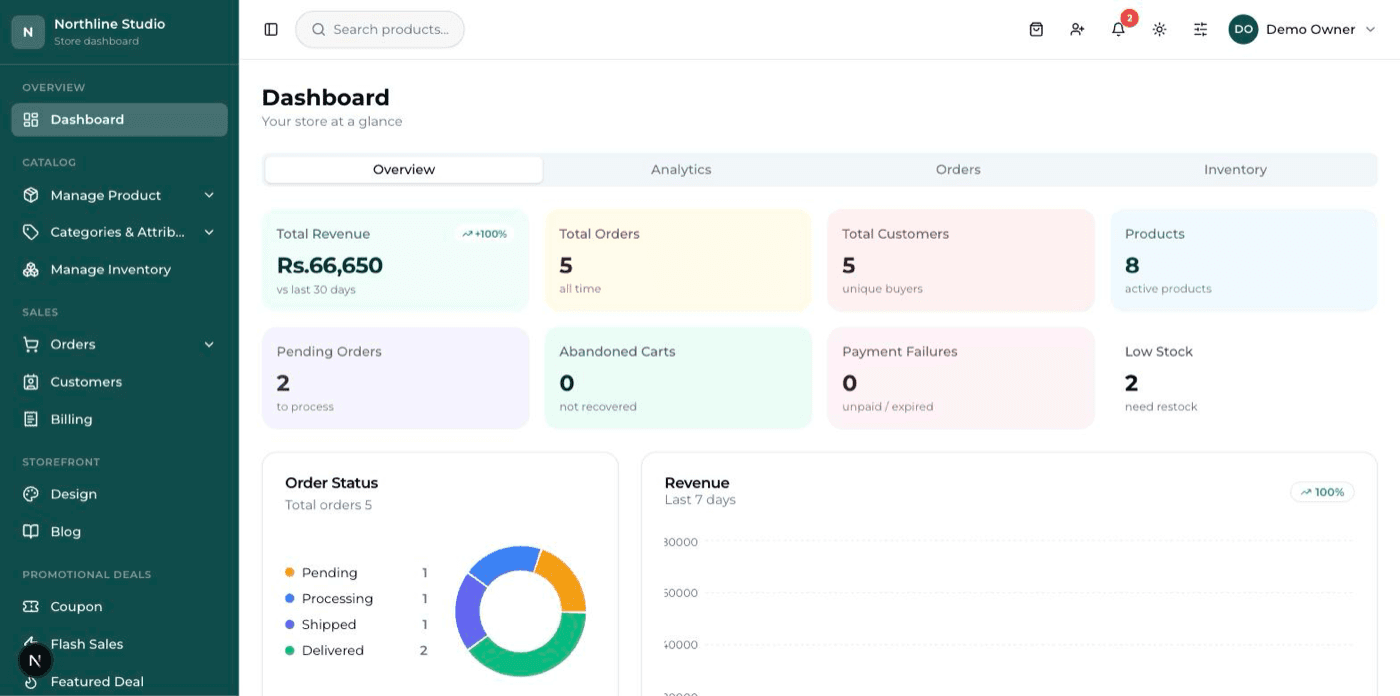
The dashboard on opening it in the morning
Money in, orders waiting, and what is running low — before you do anything else.
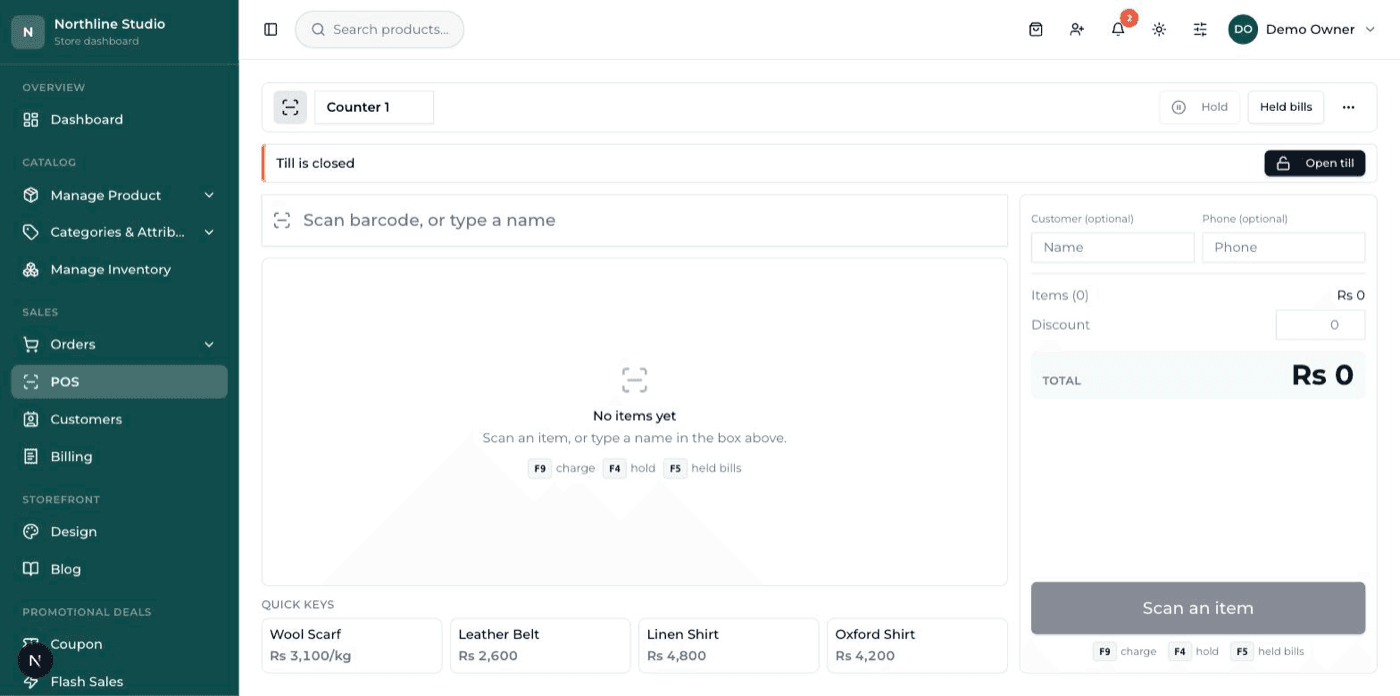
The counter till
Scan, take the money, print the receipt. The same products and the same stock as the website.

Adding a product
A form, not a spreadsheet: pictures, price, stock, colours and sizes in one place.

The Design screen
Every part of the shop's look has a tile here — colours, home page, menu, footer.
Questions about any of these screens?
Ask about the part that matters to your trade — the till, the stock, the reports — and you will get a straight answer before anything is built.
How it works
Four steps from a conversation to a shop taking orders.
Step 1: Tell us about the business
What you sell, who buys it, and whether you sell in person as well. A short conversation — by form, email or phone.
Step 2: We build and set it up
Your shop is created, styled for your trade, and filled with your categories and starting products. You get the dashboard login.
Step 3: You make it yours
Change the colours, text, home page and pages yourself from the dashboard. Add the rest of your products at your own pace, or send us the spreadsheet.
Step 4: Go live on your domain
Connect your domain, switch on how you take payment, and start selling. Support carries on after launch.
Pricing
One payment for the build with a yearly care fee, or a monthly subscription. The same product either way.
Monthly
Pay month to month. The smallest amount to start with, and everything is included while you subscribe.
Talk to us MonthlyPrice on request
- Your shop, built and launched
- Your own domain connected
- Hosting, updates and security handled
- Products, orders, customers, discounts and reviews
- Logins for you and your staff
- Support for as long as you subscribe
One-time build + yearly care
Pay once for the build, then a yearly fee that keeps it hosted, updated and supported.
Talk to us One-time build + yearly carePrice on request
- One payment for the build
- Your own domain connected
- Yearly fee covers hosting, updates and backups
- Products, orders, customers, discounts and reviews
- Logins for you and your staff
- Support included with the yearly fee
Want the actual number for your shop?
Send us what you sell, roughly how many products you have, and whether you sell at a counter as well. You will get a cost and a timeline back.
Questions
The things people ask before getting started.
Ready to put your shop online?
Start with a conversation. No obligation, and we will tell you straight if this is not the right fit for your business.