POS — the counter till
The till for the shop floor
Scan, take the money, print the receipt. A screen in your browser rather than a machine you have to buy — sharing one catalogue, one stock count and one run of bill numbers with your shop online.
- Cash, card, or a split of both
- 80mm receipts and A4 invoices
- Nothing to install
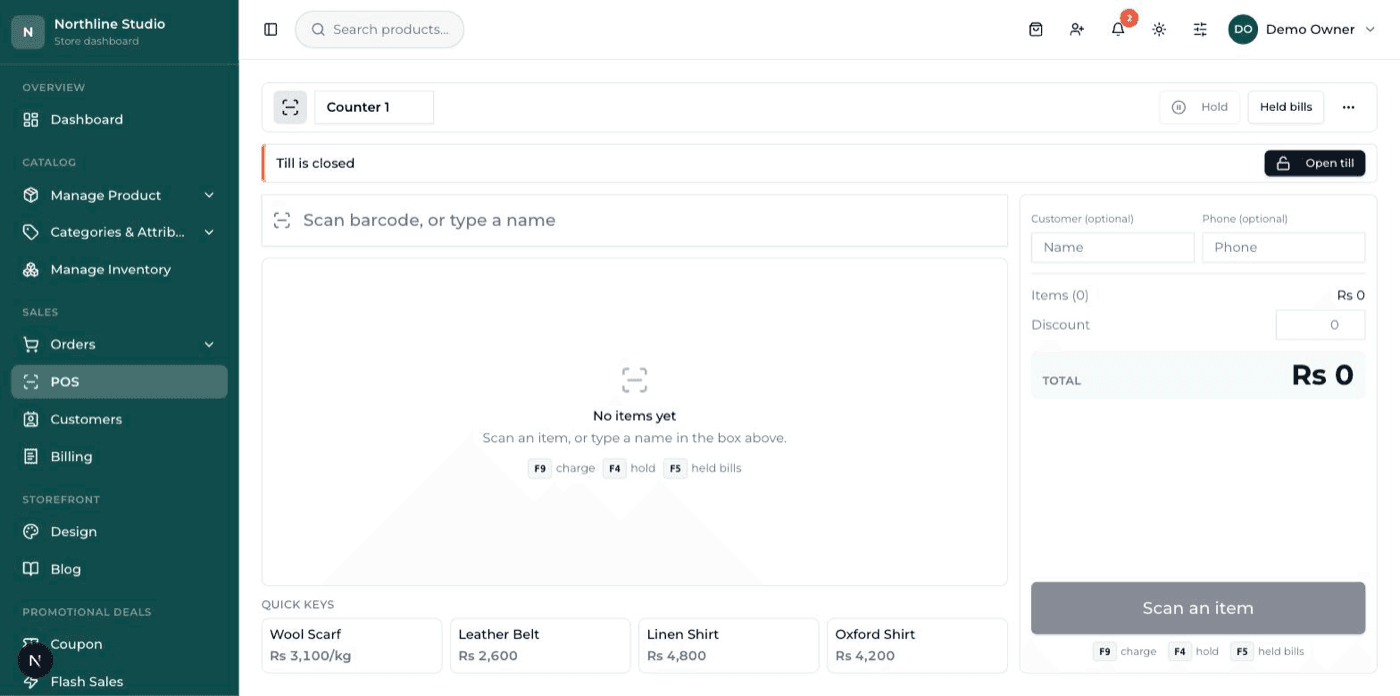
Ringing a sale
The part a cashier repeats two hundred times a day, in as few keystrokes as it can be done.
Scan, search, or tap
A scan lands the line on the bill, and scanning the same item again puts its quantity up instead of adding a second line. Anything without a barcode is found by name, or kept on screen as a tap tile — a samosa, a slice of cake, a cup of tea.
Cash, card, or a split of both
Take the lot in cash and the change is worked out for you, take it on card, or split it between the two. A split that does not add up to the bill is refused on the server.
Hold a bill and come back to it
Park a bill while that customer goes back for one more thing, serve the next person, then recall it and finish it. A held bill remembers the goods and not the prices, so a price change in between cannot go out wrong.
Sell loose goods by weight
A product can carry a price per kilo and sell by the gram. Type the weight, or tap a quarter, a half, three quarters or a full kilo — the price is worked out, and stock comes down in grams rather than pieces.
Sell something you have never sold before
Scan a barcode the shop has never seen and you can name it, price it and sell it in the same breath; it joins the catalogue with that barcode already on it. A manager has to be the one to do it.
A receipt on the roll, an invoice on A4
Receipts are laid out for an 80mm thermal roll and print through your browser, so any printer the computer already knows about will do. The last bill can be reprinted from the till.
Rules that protect the till
What a shop owner worries about when they are not the one standing at the counter.
Prices come from your catalogue, not the screen
Every line on every bill is priced on the server from your own catalogue. Nothing typed at the till can change what a product costs.
A discount needs a manager
A cashier cannot discount a bill — a manager signs in for it, the reason is written against the bill, and the discount can never be larger than the bill itself.
A return cannot go past the bill
A counter return is worked out from the original bill at the price that was actually paid, and it cannot send back more of something than that bill sold — not even across several separate returns.
Expired stock is not sold by accident
If the batch in front of the cashier is past its date, the till stops. A manager has to sign in to go past it, and that decision is recorded.
Credit over the limit is a decision, not a slip
Taking a customer past their credit limit needs a manager's explicit override, and it goes into the log with their name on it.
A record of what happened at the till
Shift opens and closes, discounts, returns, credit given, money in and out — each with the person and the time. A question about a bill has an answer.
The drawer, and the end of the day
Where the cash was when you opened, where it is now, and what the day actually earned.
Open a shift with the float
The cashier opens the till with what is in the drawer. Shifts are kept per branch, so two shops that both call their counter 'Counter 1' never run into each other's cash.
Close it against what is really there
Count the drawer at the end and the till shows what it expected, what you counted, and the difference. Card money never counts toward the drawer, and only the cash half of a split does.
Money in and out of the drawer
Petty cash out, change in — each with a reason and a name against it. Both appear in the day's figures as their own line rather than being quietly netted off.
The day's figures, cashier by cashier
Sales, cash, card, discounts given, tax collected, refunds, what the goods cost and what is left — for a day, a range, or one counter, with a line for every cashier who served.
Money owed, in both directions
The ledgers a shop keeps in a notebook, kept properly instead.
Khata — the customers who pay later
Names, numbers, and a credit limit on each one. Charge a bill to an account at the till, take a payment against it later, and print the statement when they ask what they owe.
The balance is worked out, never stored
It is added up from the ledger every time it is shown, so a bill that later gets cancelled corrects the balance by itself. There is no second number waiting to go out of step.
Money paid in advance reads as advance
A customer who has overpaid is shown as being in credit, not as a minus number. Nobody has to read a negative to work out which way the money points.
Suppliers, the same ledger the other way round
Bills coming in and payments going out, so what you still owe each supplier is a figure rather than a memory.
Stock behind the counter
Getting goods in, keeping the count honest, knowing where they are.
Goods in, with the cost and the supplier
Book a delivery in against the supplier it came from and what it cost you. Stock goes up, and the cost is there later when you want to know what you actually made on it.
Damage, theft, miscount, expired
Take stock off with a reason attached rather than quietly editing a number down. Every adjustment keeps who did it, why, and what the count was before and after.
Change a lot of prices at once
Price, stock and cost for a whole list of products on one screen, saved in one go — for the morning a supplier puts their rates up.
More than one shop
Each branch keeps its own stock and its own till, and stock moves between branches without the total changing. One branch is the one that ships the website's orders.
Barcodes and labels, printed here
A product without a barcode is given one — a proper EAN-13 in the range set aside for a shop's own goods, so it can never collide with a manufacturer's. Print them 24, 40 or 65 to an A4 sheet, or on a 38 × 25 mm label roll.
When one unit has to be told from another
Chemists, phone shops, and anyone who has been asked “when does this expire?”
Batches and expiry dates
Stock is held in batches with their own dates, and the batch that expires first is the one that sells first. A batch with no date on it waits behind every batch that has one.
See what is about to go out of date
What has expired and what expires soon, on one screen, so it can be moved while it is still worth something.
IMEI and serial numbers
Track units one at a time. Type an IMEI and it tells you which bill it went out on, when, and to whom — and it still answers if that bill was deleted afterwards.
Tax per product, where one rate does not fit
A product can carry its own tax rate. Leave it blank and it uses the shop's rate; set it to zero and it is genuinely zero-rated, which is not the same thing.
Bill numbers that run in order
#1, #2, #3 — one run for the shop, shared with your online orders, so a counter bill and a website order can never end up with the same number. A bill that fails leaves a gap rather than a duplicate.
Parcels out of the door
For the shops that sell over the counter and post things as well.
A list of what has to be packed
Waiting to be packed on one side, packed on the other, with the counts on the tabs. Mark a batch of them packed in one go.
Courier and tracking, in one step
Hand the parcel over, put the tracking number on the order, and the customer is emailed that it is on its way.
Packing slips with no prices on them
What goes in the box carries the quantities and not the money. Print one, or a whole day's worth in a single run.
What it is, plainly
The limits, said out loud rather than left to be discovered on the first busy afternoon.
It runs in a browser
A laptop, a desktop or a tablet — whatever is already on the counter. There is nothing to install, nothing to update, and no separate licence per machine.
It needs an internet connection
Every price, stock count and bill is read and written on the server as it happens, which is exactly what stops the till and the website ever disagreeing. It also means the till stops when the connection does. There is no offline mode, and we will not pretend there is.
It prints through your browser
Receipts are laid out for an 80mm roll and invoices for A4, and printing goes through the browser's own print dialog. Any printer the computer already knows about will work; there is no driver to install from us.
It is switched on shop by shop
The till is an add-on, turned on for the shops that need it. Sell online only and it is not in your sidebar at all — and if you only sell over a counter, the website can be switched off instead.
We do not sell the hardware
The scanner, the printer and the computer are bought locally and stay yours. A plug-in barcode scanner types what it reads, which is all the till asks of it.
The written guide
Every screen on this page is documented, in English and Roman Urdu, with real screenshots. Read it before you decide.
Ready to put your shop online?
Start with a conversation. No obligation, and we will tell you straight if this is not the right fit for your business.